Introduction to Information Assurance and Security
Information Assurance Concepts
Information Assurance
Measures that protect and defend information and information systems by ensuring their availability, integrity, authentication, confidentiality, and non-repudiation. These measures include providing for restoration of information systems by incorporating protection, detection, and reaction capabilities.
Information assurance is a broad, interdisciplinary field. Executives and senior management should understand what risk the organization is being protected from. Failure to understand the security requirements means you will not be able to apply the best security protection to the user environment. There are fundamental security concepts that you should know.
The three popular concepts in information security: the confidentiality, integrity, and availability (CIA) triad. Additionally, it covers concepts in information assurance such as non-repudiation and identification, authentication, authorization, and accountability (IAAA). Among the three, the CIA triad (information security) was the earliest and remains the most common assurance concept discussed in the industry. When these concepts are combined with the idea that information assurance must begin with the design of a system and account for all assets through dissolution, they form the Maconachy-Schou-Ragsdale (MSR) model.
Identification, Authentication, Authorization, and Accountability
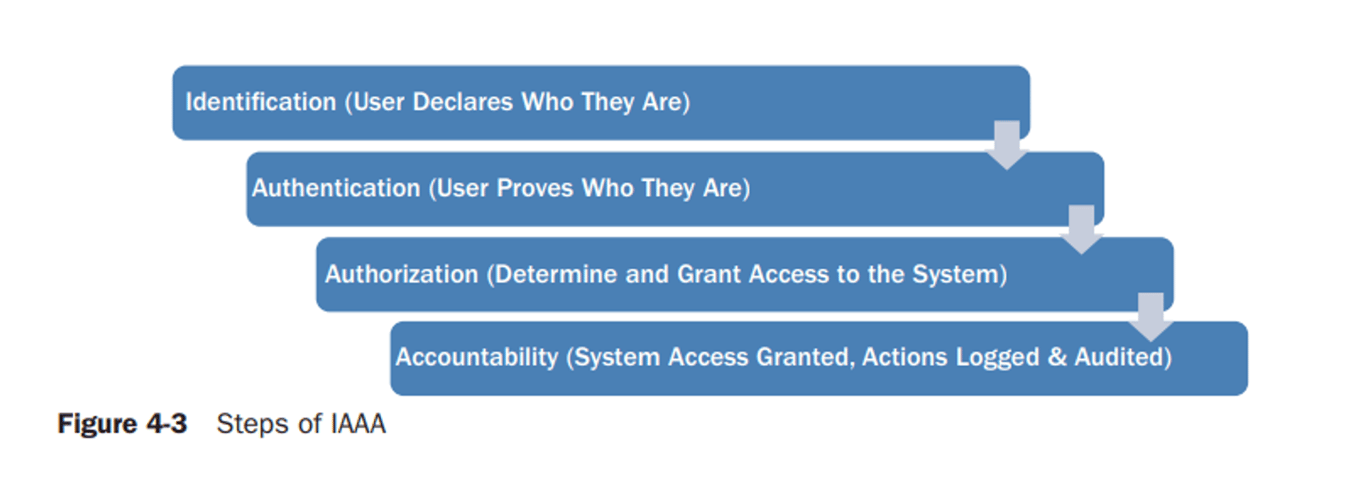
Identification, authentication, authorization, and accountability are the essential functions in providing an access management system. This service as described by the MSR model of information assurance is summarized as authentication but reflects the entire IAAA process. The overall architecture of an access management system includes the means of identifying its users, authenticating a user’s identity and credentials, and setting and controlling the access level of a user’s authorization. In addition, it should provide for logging and auditing the
trail of a user’s activity in search of privilege violations or attempted violations and accounting for system resource usage.
trail of a user’s activity in search of privilege violations or attempted violations and accounting for system resource usage.
The current industry practice for implementing IAAA security is identity management. Identity management includes, as its first step, the use of logon IDs and passwords. The system verifies that the password entered by a user matches the password linked with the individual’s logon ID. A policy should state that the password needs to
be changed frequently and must have a minimum strength. Strong passwords must not be guessed easily, such as a mother’s maiden name or place of birth, and they must have a combination of characters, symbols, and numbers to increase security. Bear in mind the current threaten environment almost renders passwords useless unless combined with other controls or factors to increase the strength of authentication.
be changed frequently and must have a minimum strength. Strong passwords must not be guessed easily, such as a mother’s maiden name or place of birth, and they must have a combination of characters, symbols, and numbers to increase security. Bear in mind the current threaten environment almost renders passwords useless unless combined with other controls or factors to increase the strength of authentication.
In the United States, the Federal Financial Institutions Examination Council (FFIEC) has ruled that a normal username/password authentication is not sufficient for electronic banking purposes that expose users to risks such as identity theft and transaction fraud. In this case, multiple layers of authentication mitigate those risks. Figure 4-3 depicts the steps to access a system and the act of recording a user’s actions during system access.
Identification
Identification is a method for a user within a system to introduce oneself. In an organization-wide identification requirement, you must address identification issues. An example would be more than one person having the same name. Identifiers must be unique so that a user can be accurately identified across the organization. Each user should have a unique identifier, even if performing multiple roles within the organization. This simplifies matters for users as well as the management of an information system. It also eases control in that an
organization may have a centralized directory or repository for better user management.
organization may have a centralized directory or repository for better user management.
A standard interface is crucial for ease of verification process. The same goes for the availability of the verification process itself. This is to ensure that access can be granted only with verification.
Authentication
Authentication validates the identification provided by a user. In other words, it makes sure the entity presenting the identification can further prove to be who they claim. To be authenticated, the entity must produce minimally a second credential. Three basic factors of authentication are available to all types of identities.
- What you should know (a shared secret, such as a password, which both the user and the authenticator know)
- What you should have (a physical identification, such as a smartcard, hardware token, or identification card)
- What you are (a measurable attribute, such as biometrics, a thumbprint, or facial recognition) In addition, organizations may consider having
an implicit factor such as a “where you are” factor. - Physical location, such as within an organization’s office.
- Logical location, such as on an internal network or private network.
- A combination of those factors can be considered to provide different
strength levels of authentication. This improves authentication and
increases security.
The following are examples of technology used for authentication:
- Public Key Infrastructure (PKI) is a system that provides authentication with certificates based on a public key cryptography method. Public key cryptography provides two independent keys generated together; one key is made public, and another is kept private. Any information protected by one key (public) can be opened only with another key (private). If one key is compromised, a new key pair must be generated.
- Smartcards can store personal information accessible by a personal identification number (PIN). An organization may consider smartcard implementation to provide another identification method via physical identification (physical security) and electronic identification (electronic access).
Authorization
Once a user presents a second credential and is identified, the system checks an access control matrix to determine their associated privileges. If the system allows the user access, the user is authorized.
Accountability
The act of being responsible for actions taken within a system is accountability. The only way to ensure accountability is to identify the user of a system and record their actions. Accountability makes non-repudiation extremely important.
MSR Model of Information Assurance
The Maconachy-Schou-Ragsdale (MSR) model points out that technology does provide some protection to information assets. However, technology alone is not enough. If an organization does not have a set of well-designed policies and procedures serving as the foundation of information assurance initiatives, deploying even the best technology would be worthless.
Information States: Where is the data?
- Transmission
- Storage
- Processing
Examples of Security Controls
A security control is any mechanism intended to avoid, stop, or minimize a risk of attack for one or more resources. There are several types of security controls; these perform differently based on their purpose.
A security control is something an organization does to help reduce risk. Examples of such controls include the following:
- Conducting annual security awareness training for This helps remind staff about proper handling of private data. It also drives awareness of the organization’s framework of security policies, standards, procedures, and guidelines.
- Putting an IT security policy framework in A policy framework is like an outline that identifies where security controls should be used.
- Designing a layered security solution for an IT infrastructure. The more layers or compartments that block or protect private data and intellectual property, the more difficult the data and property are to find and
- Performing periodic security risk assessments, audits, and penetration tests on websites and IT infrastructure. This is how security professionals verify that they have properly installed the
- Enabling security incident and event monitoring at your Internet entry and exit This is like using a microscope to see what is coming in and going out.
- Using automated workstation and server antivirus and malicious software This is the way to keep viruses and malicious software out of your computer.
- Using more stringent access controls beyond a logon ID and password for sensitive systems, applications, and Logon IDs with passwords are only one check of the user. Access to more sensitive systems should have a second test to confirm the user’s identity.
- Minimizing software weaknesses in your computers and servers by updating them with patches and security This is the way to keep your operating system and application software up to date.
- Protecting private data is the process of ensuring data confidentiality. Organizations must use proper security controls specific to this concern. Some examples include the following:
- Defining organization-wide policies, standards, procedures, and guidelines to protect confidential These are instructions for how to handle private data.
- Adopting a data classification standard that defines how to treat data throughout your IT infra- This is the road map for identifying what controls are needed to keep data safe.
- Limiting access to systems and applications that house confidential data to only those authorized to use that
- Using cryptography techniques to hide confidential data and keep that data invisible to unauthorized
- Encrypting data that cross the public
- Encrypting data that are stored within databases and storage
What is the difference between NAT / Bridged / Host-Only networking?
- Host-Only: The VM will be assigned one IP, but it's only accessible by the box VM is running on. No other computers can access it. NAT: Just like your home network with a wireless router, the VM will be assigned in a separate subnet, like 192.168.6.1 is your host computer, and VM is 192.168.6.3, then your VM can access outside network like your host, but no outside access to your VM directly, it's protected.
- Bridged: Your VM will be in the same network as your host, if your host IP is 172.16.120.45 then your VM will be like 172.16.120.50. It can be accessed by all computers in your host network.
Port forwarding allows remote computers (for example, computers on the Internet) to connect to a specific computer or service within a private local-area network (LAN). The computers behind the router, on the other hand, are invisible to hosts on the Internet as they each communicate only with a private IP address.
How Your Router Handles Requests and Uses Ports
Here’s a map of a simple home network. The cloud icon represents the greater internet and your public, or forward-facing, Internet Protocol (IP) address. This IP address represents your entire household from the outside world–like a street address, in a way.
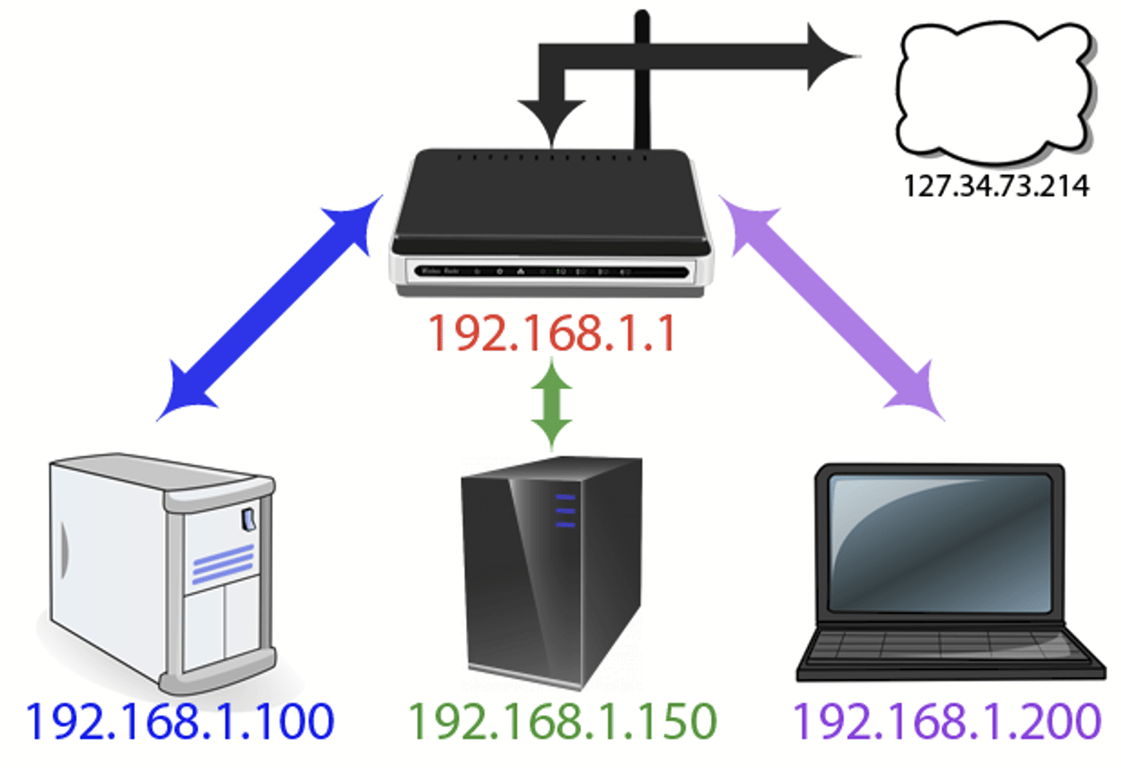
The red address 192.1.168.1 is the router address within your network. The additional addresses all belong to the computers seen at the bottom of the image. If your public IP address is like a street
address, think of the internal IP addresses like apartment numbers for that street address.
address, think of the internal IP addresses like apartment numbers for that street address.
The diagram raises an interesting question which you may not have thought about before. How does all the information from the internet get to the right device inside the network? If you visit howtogeek.com on your laptop how does it end up on your laptop and not your son’s desktop if the public-facing IP address is the same for all devices?
This is thanks to a wonderful bit of routing magic known as a Network Address Translation (NAT). This function occurs at the router level where the NAT acts as a traffic cop, directing the flow of network traffic through the router so that a single public IP address can be shared among all the devices behind the router. Because of the NAT, everyone in your household can request websites and other internet content simultaneously and it will all be delivered to the right device.
Cryptographic Concepts
Cryptographic Concepts
Cryptography (literally meaning "secret writing") has been around for thousands of years. It is the art of making information secure by encoding it.
Security through obscurity means keeping something a secret by hiding it.
With cryptography, it does not matter if third parties know of the existence of the secret, because they can never know what it is without obtaining an appropriate credential.
The following terminology is used to discuss cryptography:
- Plaintext(or cleartext)—an unencrypted message.
- Ciphertext—an encrypted message.
- Cipher—the process (or algorithm) used to encrypt and decrypt a message.
- Cryptanalysis—the art of cracking cryptographic systems.
Cryptography is the study of secure communications techniques that allow only the sender and intended recipient of a message to view its contents. The term is derived from the Greek word kryptos, which means hidden.
Difference between Encryption and Cryptography
Encryption | Cryptography |
It is a process of encoding message or information so that only authorized parties can have access to it. | It is study of techniques such as encryption for secure communication in presence of third parties. |
It is considered as principal application of cryptography. | It is considered as art of creating codes using techniques of encryption and decryption. |
It simply uses algorithm to encrypt data and secret key to decrypt it. | It simply provides methods of protecting data through encryption and its related processes. |
It is all about mathematical and algorithmic in nature. | It is all about techniques and technologies in nature. |
Its main purpose is confidentiality that means concealing content of message by translating it into code. | Its main purpose is to apply complex mathematics and logic to design strong encryption methods. |
Types of encryption includes symmetric and asymmetric encryption. | Types of cryptography includes symmetric key cryptography and asymmetric key cryptography. |
It provides security to data all times, maintains integrity, protects privacy, protects data across devices, etc. | In provides techniques like encryption techniques that can guard information and communication, cryptographic technique like MAC and digital signatures to protect information against spoofing and forgeries. |
Hashing Algorithms
Hashing is the simplest type of cryptographic operation. A cryptographic hashing algorithm produces a fixed length string from an input plaintext that can be of any length. The output can be referred to as a checksum, message digest, or hash. The function is designed so that it is impossible to recover the plaintext data from the digest (one-way) and so that different inputs are unlikely to produce the same output (a collision).
Hash functions are extremely useful and appear in almost all information security applications. A hash function is a mathematical function that converts a numerical input value into another compressed numerical value. The input to the hash function is of arbitrary length but output is always of fixed length.
Values returned by a hash function are called message digest or simply hash values.
Hashing Algorithms:
- Message Digest (MD) Algorithm
- Secure Hash Algorithm (SHA)
- RACE Integrity Primitives Evaluation Message Digest (RIPEMD)
- Whirlpool
- RSA
There are two popular implementations hash algorithms:
- Secure Hash Algorithm (SHA)—considered the strongest algorithm.There are variants that produce different-sized outputs, with longer digests considered more secure. The most popular variant is SHA-256, which produces a 256-bit digest.
- Message Digest Algorithm #5 (MD5)—produces a 128-bit digest. MD5 is not considered to be quite as safe for use as SHA-256, but it might be required for compatibility between security products.
Encryption
What is Encryption?
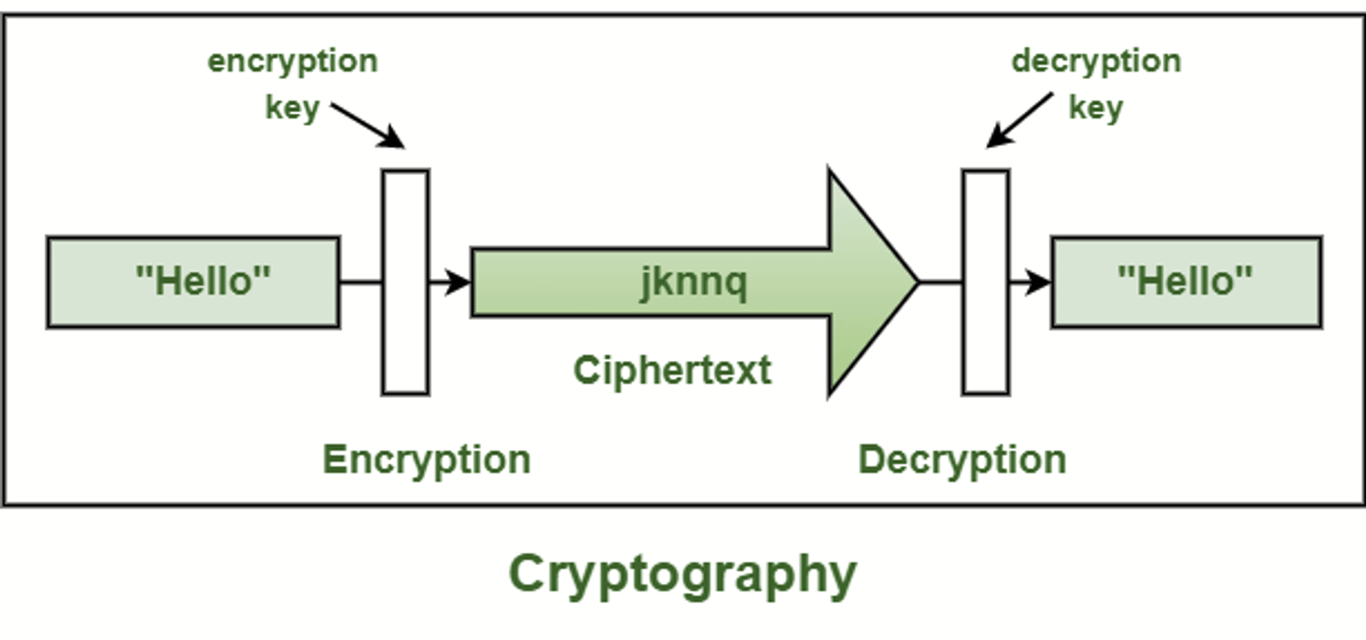
Encryption is a process that encodes a message or file so that it can be only be read by certain people. Encryption uses an algorithm to scramble, or encrypt, data and then uses a key for the receiving party to unscramble, or decrypt, the information.
In cryptography, encryption is the process of encoding information. This process converts the original representation of the information, known as plaintext, into an alternative form known as ciphertext.
Ideally, only authorized parties can decipher a ciphertext back to plaintext and access the original information.
Ideally, only authorized parties can decipher a ciphertext back to plaintext and access the original information.
Basic forms of encryption may be as simple as switching letters. As cryptography advanced, cryptographers added more steps, and decryption became more difficult. Wheels and gears would be combined to create complex encryption systems. Computer algorithms have now replaced mechanical encryption.
How Encryption Works
Encryption uses algorithms to scramble your information. It is then transmitted to the receiving party, who is able to decode the message with a key. There are many types of algorithms, which all involve different ways of scrambling and then decrypting information.
How are Encryption Keys Generated?
Keys are usually generated with random number generators or computer algorithms that mimic random number generators. A more complex way that computers can create keys is by using user mouse movement to create unique seeds. Modern systems that have forward secrecy involve generating a fresh key for every session, to add another layer of security.
Encrypt Terms
- Key — random string of bits created specifically for scrambling and unscrambling data. These are used to encrypt and/or decrypt data. Each key is unique and created via an algorithm to make sure it is unpredictable. Longer keys are harder to crack. Common key lengths are 128 bits for symmetric key algorithms and 2048 bits for public-key algorithms.
- Private Key (or Symmetric-Key): This means that the encryption and decryption keys are the same. The two parties must have the same key before they can achieve secure communication.
- Public Key: This means that the encryption key is published and available for anyone to use. Only the receiving party has access to the decryption key that enables them to read the message.
- Cipher — an algorithm used for encryption or decryption. It is a set of steps that are followed as a procedure to encrypt information. There are two main types of ciphers, block ciphers, and stream ciphers.
- Algorithm — an algorithm is a procedure that the encryption process follows. The specific algorithm is called the cipher, or code. There are many types of encryption algorithms. The encryption’s goal and level of security determine the most effective solution. Triple DES, RSA, and Blowfish are some examples of encryption algorithms or ciphers.
- Decryption — the process of switching unreadable ciphertext to readable information.
- Cryptanalysis — the study of ciphers and cryptosystems to find weaknesses in them that would allow access to the information without knowing the key or algorithm.
- Frequency Analysis — a technique used to crack a cipher. Those trying to decrypt a message will study the frequency of letters or groups of letters in a ciphertext. Because some letters occur more often than others, the frequency of letters can reveal parts of the encrypted message. While this method was effective in cracking old encryption methods, it is ineffective against modern encryption.
Block and Stream Encryption
What is a block cipher?
A block cipher is an encryption algorithm that encrypts a fixed size of n-bits of data - known as a block - at one time. The usual sizes of each block are 64 bits, 128 bits, and 256 bits. So for example, a 64-bit block cipher will take in 64 bits of plaintext and encrypt it into 64 bits of ciphertext. In cases where bits of plaintext are shorter than the block size, padding schemes are called into play. The majority of the symmetric ciphers used today are actually blocked ciphers. DES, Triple DES, AES, IDEA, and Blowfish are some of the commonly used encryption algorithms that fall under this group.
Popular block ciphers
- DES - DES, which stands for Data Encryption Standard, used to be the most popular block cipher in the world and was used in several industries. It's still popular today, but only because it's usually included in historical discussions of encryption algorithms. The DES algorithm became a standard in the US in 1977. However, it's already been proven to be vulnerable to brute force attacks and other cryptanalytic methods. DES is a 64-bit cipher that works with a 64-bit key. Actually, 8 of the 64 bits in the key are parity bits, so the key size is technically 56 bits long.
- 3DES - As its name implies, 3DES is a cipher based on DES. It's practically DES that's run three times. Each DES operation can use a different key, with each key being 56 bits long. Like DES, 3DES has a block size of 64 bits. Although 3DES is many times stronger than DES, it is also much slower (about 3x slower). Because many organizations found 3DES to be too slow for many applications, it never became the ultimate successor of DES. That distinction is reserved for the next cipher in our list - AES.
- AES - A US Federal Government standard since 2002, AES or Advanced Encryption Standard is arguably the most widely used block cipher in the world. It has a block size of 128 bits and supports three possible key sizes - 128, 192, and 256 bits. The longer the key size, the stronger the encryption. However, longer keys also result in longer processes of encryption.
- Blowfish - This is another popular block cipher (although not as widely used as AES). It has a block size of 64 bits and supports a variable-length key that can range from 32 to 448 bits. One thing that makes blowfish so appealing is that Blowfish is unpatented and royalty-free.
- Twofish - Yes, this cipher is related to Blowfish but it's not as popular (yet). It's a 128-bit block cipher that supports key sizes up to 256 bits long.
What is a stream cipher?
A stream cipher is an encryption algorithm that encrypts 1 bit or byte of plaintext at a time. It uses an infinite stream of pseudorandom bits as the key. For a stream cipher implementation to remain secure, its pseudorandom generator should be unpredictable and the key should never be reused. Stream ciphers are designed to approximate an idealized cipher, known as the One-Time Pad.
The One-Time Pad, which is supposed to employ a purely random key, can potentially achieve "perfect secrecy". That is, it's supposed to be fully immune to brute force attacks. The problem with the one-time pad is that, in order to create such a cipher, its key should be as long or even longer than the plaintext. In other words, if you have a 500 MegaByte video file that you would like to encrypt, you would need a key that's at least 4 Gigabits long.
Clearly, while Top Secret information or matters of national security may warrant the use of a one-time pad, such a cipher would just be too impractical for day-to-day public use. The key of a stream cipher is no longer as long as the original message. Hence, it can no longer guarantee "perfect secrecy". However, it can still achieve a strong level of security.
Popular stream ciphers
- RC4 - RC4, which stands for Rivest Cipher 4, is the most widely used of all stream ciphers, particularly in software. It's also known as ARCFOUR or ARC4. RC4 stream ciphers have been used in various protocols like WEP and WPA (both security protocols for wireless networks) as well as in TLS. Unfortunately, recent studies have revealed vulnerabilities in RC4, prompting Mozilla and Microsoft to recommend that it be disabled where possible. In fact, RFC 7465 prohibits the use of RC4 in all versions of TLS.
- These recent findings will surely allow other stream ciphers (e.g. SALSA, SOSEMANUK, PANAMA, and many others, which already exist but never gained the same popularity as RC4) to emerge and possibly take their place.
Caesar Cipher
In cryptography, a Caesar cipher, also known as a shift cipher, Caesar's cipher, Caesar's code, or Caesar shift, is one of the simplest and most widely known encryption techniques. It is a type of substitution cipher in which each letter in the plaintext is 'shifted' a certain number of places down the alphabet. For example, with a shift of 1, A would be replaced by B, B would become C, and so on. The method is named after Julius Caesar, who apparently used it to communicate with his generals.
More complex encryption schemes such as the vigenere cipher employ the Caesar cipher as one element of the encryption process. The widely known ROT13 'encryption' is simply a Caesar cipher with an offset of 13. As with all single-alphabet substitution ciphers, the Caesar cipher is easily broken and in modern practice offers essentially no communication security.
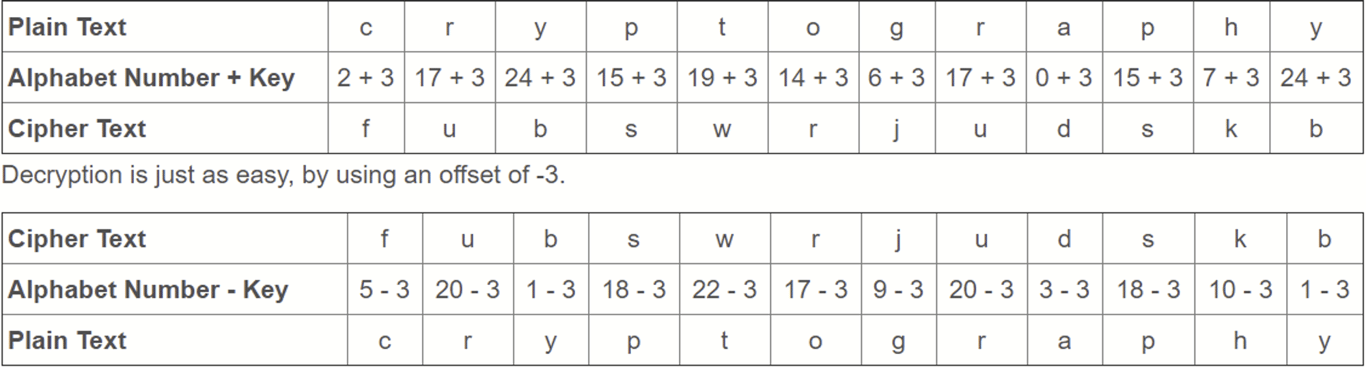
The encryption of Caesar cipher can be represented using modular arithmetic by first transforming the letters into numbers, according to the scheme, A = 0, B = 1,..., Z = 25. Encryption of a letter x by a
shift n can be described mathematically as,
shift n can be described mathematically as,
Decryption is performed similarly,
Example:
To pass an encrypted message from one person to another, it is first necessary that both parties have the 'key' for the cipher, so that the sender may encrypt it and the receiver may decrypt it. For the Caesar cipher, the key is the number of characters to shift the cipher alphabet.
Here is a quick example of the encryption and decryption of Caesar cipher. The text we will encrypt is 'cryptography', with a shift (key) of 3.
Social Engineering
Social engineering is the art of manipulating, influencing, or deceiving you in order to gain control over your computer system. The hacker might use the phone, email, snail mail or direct contact to gain illegal access. Phishing, spear phishing, and CEO Fraud are all examples.
Social Engineer — The goal of a social engineer is to fool someone into providing valuable information or access to that information. In most cases the attacker never comes face-to-face with the victim, but they get the information or the access they need to commit fraud nearly 100% of the time.
Common Methods of Social Engineering Attacks
Understanding the different attack vectors for this type of crime is key when it comes to prevention. This is how cybercriminals do it:
- Pretexting — an invented scenario is used to engage a potential victim to try and increase the chance that the victim will bite. It's a false motive usually involving some real knowledge of the victim (e.g. date of birth, Social Security number, etc.) in an attempt to get even more information.
- Diversion Theft — a 'con' exercised by professional thieves, usually targeted at a transport or courier company. The objective is to trick the company into making the delivery somewhere other than the intended location.
- Phishing — the process of attempting to acquire sensitive information such as usernames, passwords, and credit card details by masquerading as a trustworthy entity using bulk email which tries to evade spam filters. Emails claiming to be from popular social websites, banks, auction sites, or IT administrators are commonly used to lure the unsuspecting public. It’s a form of criminally fraudulent social engineering.
- Spear Phishing — a small, focused, targeted attack via email on a particular person or organization with the goal to penetrate their defenses. The spear phishing attack is done after research on the target and has a specific personalized component designed to make the target do something against their own interest. Here is more about how they do it.
- Water-Holing — this technique takes advantage of websites people regularly visit and trust. The attacker will gather information about a targeted group of individuals to find out what those websites are, then test those websites for vulnerabilities. Over time, one or more members of the targeted group will get infected and the attacker can gain access to the secure system.
- Baiting — baiting means dangling something in front of a victim so that they take action. It can be through a peer-to-peer or social networking site in the form of a (porn) movie download or it can be a USB drive labeled “Q1 Layoff Plan” left out in a public place for the victim to find. Once the device is used or malicious file is downloaded, the victim’s computer is infected allowing the criminal to take over the network.
- Quid Pro Quo — Latin for 'something for something', in this case it's a benefit to the victim in exchange for information. A good example is hackers pretending to be IT support. They will call everyone they can find at a company to say they have a quick fix and "you just need to disable your AV". Anyone that falls for it gets malware like ransomware installed on their machine.
- Tailgating — a method used by social engineers to gain access to a building or other protected area. A tailgater waits for an authorized user to open and pass through a secure entry and then follows right behind.
- Honeytrap — a trick that makes men interact with a fictitious attractive female online. From old spy tactics where a real female was used.
- Rogue — also Rogue Scanner, rogue anti-spyware, rogue anti-malware or scareware, rogue security software is a form of computer malware that deceives or misleads users into paying for the fake or simulated removal of malware. Rogue security software, in recent years, has become a growing and serious security threat in desktop computing. It is very popular and there are literally dozens of these programs.
- Dumpster Diving — searching through trash or recycling bins to find confidential information such as passwords, account numbers, or other sensitive data.
- Impersonation — pretending to be someone else, such as a bank employee or government official, to gain access to sensitive information.
Review Notes: Social Engineering
- Social engineering is a technique used by hackers to manipulate or deceive individuals to gain access to their computer systems. The objective is to extract valuable information or access to information that can be used for fraudulent activities.
- Attackers use various methods to conduct social engineering attacks, including pretexting, diversion theft, phishing, spear phishing, water-holing, baiting, quid pro quo, tailgating, honeytrap, and impersonation. Understanding the different attack vectors is essential to prevent these crimes.
- Pretexting involves using a false motive to engage a potential victim to extract sensitive information. Diversion theft is used to trick a courier company into making deliveries to the wrong location. Phishing uses bulk email to acquire sensitive information, while spear phishing is a targeted attack on a particular person or organization. Water-holing targets websites that individuals regularly visit, while baiting involves dangling something in front of a victim to take action.
- Quid pro quo involves promising a benefit in exchange for information, while tailgating involves following an authorized user into a secure area. Honeytrap is a trick that involves making men interact with a fictitious attractive female online, while impersonation involves pretending to be someone else to gain access to sensitive information.
- Dumpster diving is a technique used to search for confidential information in trash or recycling bins. Rogue security software is a type of malware that misleads users into paying for the fake removal of malware.
Overall, social engineering attacks are a serious security threat and can lead to significant financial losses or reputation damage. It is essential to stay aware of these attacks and take preventative measures to avoid falling victim to these crimes.
Implementing Authentication Controls
Implementing Authenticating Control refers to the process of putting in place security measures that ensure that only authorized users can access sensitive information or systems.
Authentication controls are typically implemented through the use of usernames and passwords, biometric identification, or security tokens. The goal is to confirm the identity of the user before granting access to the system or data.
To implement authentication controls, an organization typically starts by identifying the critical data and systems that require protection. They then develop a set of policies and procedures for managing user accounts, passwords, and access privileges. These policies and procedures should be based on industry best practices and regulatory requirements, as well as the organization's specific needs and risk profile.
In addition to implementing authentication controls, organizations should also regularly review and test their security measures to ensure that they are effective and up-to-date. This may involve conducting vulnerability assessments, penetration testing, or other types of security audits. By staying vigilant and proactive, organizations can reduce the risk of data breaches and other security incidents.
Authentication is the process of verifying that an individual, entity or website is whom it claims to be. Authentication in the context of web applications is commonly performed by submitting a username or ID and one or more items of private information that only a given user should know.
Session Management is a process by which a server maintains the state of an entity interacting with it. This is required for a server to remember how to react to subsequent requests throughout a transaction. Sessions are maintained on the server by a session identifier which can be passed back and forward between the client and server when transmitting and receiving requests. Sessions should be unique per user and computationally very difficult to predict. .
Authentication General Guidelines
User IDs
Make sure your usernames/user IDs are case-insensitive. User 'smith' and user 'Smith' should be the same user. Usernames should also be unique. For high-security applications, usernames could be assigned and secret instead of user-defined public data.
Authentication Solution and Sensitive Accounts
- Do NOT allow login with sensitive accounts (i.e. accounts that can be used internally within the solution such as to a back-end /middle-ware / DB) to any front-end user-interface
- Do NOT use the same authentication solution (e.g. IDP / AD) used internally for unsecured access (e.g. public access / DMZ)
Implement Proper Password Strength Controls
A key concern when using passwords for authentication is password strength. A "strong" password policy makes it difficult or even improbable for one to guess the password through either manual or automated means. The following characteristics define a strong password:
- Password Length
- Minimum length of the passwords should be enforced by the application. Passwords shorter than 8 characters are considered to be weak (NIST SP800-63B).
- Maximum password length should not be set too low, as it will prevent users from creating passphrases. A common maximum length is 64 characters due to limitations in certain hashing algorithms, as discussed in the Password Storage Cheat Sheet. It is important to set a maximum password length to prevent long password Denial of Service attacks.
- Do not silently truncate passwords.
- Allow usage of all characters including unicode and whitespace.There should be no password composition rules limiting the type of characters permitted.
- Ensure credential rotation when a password leak, or at the time of compromise identification.
- Include password strength meter to help users create a more complex password and block common and previously breached passwords
- zxcvbn library can be used for this purpose. (Note that this library is no longer maintained)
- Pwned Passwords is a service where passwords can be checked against previously breached passwords. You can host it yourself or use API.
Implement Secure Password Recovery Mechanism
It is common for an application to have a mechanism that provides a means for a user to gain access to their account in the event they forget their password.
Store Passwords in a Secure Fashion
It is critical for an application to store a password using the right cryptographic technique. Please see Password Storage Cheat Sheet for details on this feature.
Compare Password Hashes Using Safe Functions
Where possible, the user-supplied password should be compared to the stored password hash using a secure password comparison function provided by the language or framework, such as
the password_verify() function in PHP. Where this is not possible, ensure that the comparison function:
the password_verify() function in PHP. Where this is not possible, ensure that the comparison function:
- Has a maximum input length, to protect against denial of service attacks with very long inputs.
- Explicitly sets the type of both variable, to protect against type confusion attacks such as Magic H ashes in PHP.
- Returns in constant time, to protect against timing attacks.
Change Password Feature
When developing change password feature, ensure to have:
- User is authenticated with active session.
- Current password verification. This is to ensure that it's the legitimate user who is changing the password. The abuse case is this: a legitimate user is using public computer to login. This user forgets to logout. Then another user is using this public computer. If we don't verify current password, this another user able to change the password.
Transmit Passwords Only Over TLS or Other Strong Transport
The login page and all subsequent authenticated pages must be exclusively accessed over TLS or other strong transport. The initial login page referred to as the "login landing page", must be served over TLS or other strong transport. Failure to utilize TLS or other strong transport for the login landing page allows an attacker to modify the login form action, causing the user's credentials to be posted to an arbitrary location. Failure to utilize TLS or other strong transport for authenticated pages after login enables an attacker to view the unencrypted session ID and compromise the user's authenticated session.
Require Re-authentication for Sensitive Features
In order to mitigate CSRF and session hijacking, it's important to require the current credentials for an account before updating sensitive account information such as the user's password, user's email, or
before sensitive transactions, such as shipping a purchase to a new address. Without this countermeasure, an attacker may be able to execute sensitive transactions through a CSRF or XSS attack without needing to know the user's current credentials. Additionally, an attacker may get temporary physical access to a user's browser or steal their session ID to take over the user's session.
before sensitive transactions, such as shipping a purchase to a new address. Without this countermeasure, an attacker may be able to execute sensitive transactions through a CSRF or XSS attack without needing to know the user's current credentials. Additionally, an attacker may get temporary physical access to a user's browser or steal their session ID to take over the user's session.
Consider Strong Transaction Authentication
Some applications should use a second factor to check whether a user may perform sensitive operations.
TLS Client Authentication
TLS Client Authentication, also known as two-way TLS authentication, consists of both, browser and server, sending their respective TLS certificates during the TLS handshake process. Just as you can validate the authenticity of a server by using the certificate and asking a well known Certificate Authority (CA) if the certificate is valid, the server can authenticate the user by receiving a certificate from the client and validating against a third party CA or its own CA. To do this, the server must provide the user with a certificate generated specifically for him, assigning values to the subject so that these can be used to determine what user the certificate should validate. The user installs the certificate on a browser and now uses it for the website.
It is a good idea to do this when:
- It is acceptable (or even preferred) that the user only has access to the website from only a single computer/browser.
- The user is not easily scared by the process of installing TLS
certificates on his browser, or there will be someone, probably from IT
support, that will do this for the user. - The website requires an extra step of security.
- It is also a good thing to use when the website is for an intranet of a company or organization.
It is generally not a good idea to use this method for widely and publicly available websites that will have an average user. For example, it wouldn't be a good idea to implement this for a website like
Facebook. While this technique can prevent the user from having to type a password (thus protecting against an average keylogger from stealing it), it is still considered a good idea to consider using both a password and TLS client authentication combined.
Facebook. While this technique can prevent the user from having to type a password (thus protecting against an average keylogger from stealing it), it is still considered a good idea to consider using both a password and TLS client authentication combined.
Additionally, if the client is behind an enterprise proxy which performs SSL/TLS decryption, this will break certificate authentication unless the site is allowed on the proxy.
Authentication and Error Messages
Incorrectly implemented error messages in the case of authentication functionality can be used for the purposes of user ID and password numeration. An application should respond (both HTTP and HTML) in a generic manner.
Authentication Responses
Using any of the authentication mechanisms (login, password reset or password recovery), an application must respond with a generic error message regardless of whether:
- The user ID or password was incorrect.
- The account does not exist.
- The account is locked or disabled.
The account registration feature should also be taken into consideration, and the same approach of generic error message can be applied regarding the case in which the user exists.
The objective is to prevent the creation of a discrepancy factor, allowing an attacker to mount a user enumeration action against the application.
It is interesting to note that the business logic itself can bring a discrepancy factor related to the processing time taken. Indeed, depending on the implementation, the processing time can be significantly different according to the case (success vs failure) allowing an attacker to mount a time-based attack (delta of some seconds for example).
Example using pseudo-code for a login feature:
- First implementation using the "quick exit" approach
IF USER_EXISTS(username) THEN
password_hash=HASH(password)
IS_VALID=LOOKUP_CREDENTIALS_IN_STORE(username, password_hash)
IF NOT IS_VALID THEN
RETURN Error("Invalid Username or Password!")
ENDIF
ELSE
RETURN Error("Invalid Username or Password!")
ENDIF
It can be clearly seen that if the user doesn't exist, the application will directly throw an error. Otherwise, when the user exists and the password doesn't, it is apparent that there will be more processing before the application errors out. In return, the response time will be different for the same error, allowing the attacker to differentiate between a wrong username and a wrong password.
- Second implementation without relying on the "quick exit" approach:
password_hash=HASH(password)
IS_VALID=LOOKUP_CREDENTIALS_IN_STORE(username, password_hash)
IF NOT IS_VALID THEN
RETURN Error("Invalid Username or Password!")
ENDIF
This code will go through the same process no matter what the user or the password is, allowing the application to return in approximately the same response time.
The problem with returning a generic error message for the user is a User Experience (UX) matter. A legitimate user might feel confused with the generic messages, thus making it hard for them to use the application, and might after several retries, leave the application because of its complexity. The decision to return a generic error message can be determined based on the criticality of the application and its data. For example, for critical applications, the team can decide that under the failure scenario, a user will always be redirected to the support page and a generic error message will be returned.
Regarding the user enumeration itself, protection against brute-force attack are also effective because they prevent an attacker from applying the enumeration at scale. Usage of CAPTCHA can be applied on a feature for which a generic error message cannot be returned because the user experience must be preserved.
INCORRECT AND CORRECT RESPONSE EXAMPLES
Login
Incorrect response examples:
- "Login for User foo: invalid password."
- "Login failed, invalid user ID."
- "Login failed; account disabled."
- "Login failed; this user is not active."
Correct response example:
- "Login failed; Invalid user ID or password."
Password recovery
Incorrect response examples:
- "We just sent you a password reset link."
- "This email address doesn't exist in our database."
Correct response example:
- "If that email address is in our database, we will send you an email to reset your password."
Account creation
Incorrect response examples:
- "This user ID is already in use."
- "Welcome! You have signed up successfully."
Correct response example:
- "A link to activate your account has been emailed to the address provided."
ERROR CODES AND URLS
The application may return a different HTTP Error code depending on the authentication attempt response. It may respond with a 200 for a positive result and a 403 for a negative result. Even though a generic error page is shown to a user, the HTTP response code may differ which can leak information about whether the account is valid or not.
Error disclosure can also be used as a discrepancy factor, consult the error handling cheat sheet regarding the global handling of different errors in an application.
Protect Against Automated Attacks
There are a number of different types of automated attacks that attackers can use to try and compromise user accounts. The most common types are listed below:
Attack Type | Description |
Brute Force | Testing multiple passwords from a dictionary or other source against a single account. |
Credential Stuffing | Testing username/password pairs obtained from the breach of another site. |
Password Spraying | Testing a single weak password against a large number of different accounts. |
Different protection mechanisms can be implemented to protect against these attacks. In many cases, these defenses do not provide complete protection, but when a number of them are implemented in a defense-in-depth approach, a reasonable level of protection can be achieved.
The following sections will focus primarily on preventing brute-force attacks, although these controls can also be effective against other types of attacks.
Multi-Factor Authentication
Multi-factor authentication (MFA) is by far the best defense against the majority of password-related attacks, including brute-force attacks, with analysis by Microsoft suggesting that it would have stopped 99.9% of account compromises. As such, it should be implemented wherever possible; however, depending on the audience of the application, it may not be practical or feasible to enforce the use of MFA.
Account Lockout
The most common protection against these attacks is to implement account lockout, which prevents any more login attempts for a period after a certain number of failed logins.
The counter of failed logins should be associated with the account itself, rather than the source IP address, in order to prevent an attacker from making login attempts from a large number of different IP
addresses. There are a number of different factors that should be considered when implementing an account lockout policy in order to find a balance between security and usability:
addresses. There are a number of different factors that should be considered when implementing an account lockout policy in order to find a balance between security and usability:
- The number of failed attempts before the account is locked out (lockout threshold).
- The time period that these attempts must occur within (observation window).
- How long the account is locked out for (lockout duration).
Rather than implementing a fixed lockout duration (e.g., ten minutes), some applications use an exponential lockout, where the lockout duration starts as a very short period (e.g., one second), but
doubles after each failed login attempt.
doubles after each failed login attempt.
When designing an account lockout system, care must be taken to prevent it from being used to cause a denial of service by locking out other users' accounts. One way this could be performed is to allow the user of the forgotten password functionality to log in, even if the account is locked out.
CAPTCHA
The use of an effective CAPTCHA can help to prevent automated login attempts against accounts. However, many CAPTCHA implementations have weaknesses that allow them to be solved using automated techniques or can be outsourced to services which can solve them. As such, the use of CAPTCHA should be viewed as a defense-in-depth control to make brute-force attacks more time consuming and expensive, rather than as a preventative.It may be more user-friendly to only require a CAPTCHA be solved after a small number of failed login attempts, rather than requiring it
from the very first login.
from the very first login.
Security Questions and Memorable Words
The addition of a security question or memorable word can also help protect against automated attacks, especially when the user is asked to enter a number of randomly chosen characters from the word. It should be noted that this does not constitute multi-factor authentication, as both factors are the same (something you know). Furthermore, security questions are often weak and have predictable answers, so they must be carefully chosen.
Logging and Monitoring
Enable logging and monitoring of authentication functions to detect attacks/failures on a real-time basis
- Ensure that all failures are logged and reviewed
- Ensure that all password failures are logged and reviewed
- Ensure that all account lockouts are logged and reviewed
Use of authentication protocols that require no password
While authentication through a user/password combination and using multi-factor authentication is considered generally secure, there are use cases where it isn't considered the best option or even safe. Examples of this are third party applications that desire connecting to the web application, either from a mobile device, another website, desktop or other situations. When this happens, it is NOT considered safe to allow the third-party application to store the user/password combo, since then it extends the attack surface into their hands, where it isn't in your control. For this, and other use cases, there are several authentication protocols that can protect you from exposing your users' data to attackers.
OAuth
Open Authorization (OAuth) is a protocol that allows an application to authenticate against a server as a user, without requiring passwords or any third party server that acts as an identity provider. It uses a token generated by the server and provides how the authorization flows most occur, so that a client, such as a mobile application, can tell the server what user is using the service.
The recommendation is to use and implement OAuth 1.0a or OAuth 2.0 since the very first version (OAuth1.0) has been found to be vulnerable to session fixation.
OAuth 2.0 relies on HTTPS for security and is currently used and implemented by APIs from companies such as Facebook, Google, Twitter and Microsoft. OAuth1.0a is more difficult to use because it requires the use of cryptographic libraries for digital signatures. However, since OAuth1.0a does not rely on HTTPS for security, it can be more suited for higher-risk transactions.
OpenId
OpenId is an HTTP-based protocol that uses identity providers to validate that a user is who they say they are. It is a very simple protocol which allows a service provider initiated way for single sign-on (SSO). This allows the user to re-use a single identity given to a trusted OpenId identity provider and be the same user in multiple websites, without the need to provide any website with the password,
except for the OpenId identity provider.
except for the OpenId identity provider.
Due to its simplicity and that it provides protection of passwords, OpenId has been well adopted. Some of the well-known identity providers for OpenId are Stack Exchange, Google, Facebook and Yahoo!
SAML
Security Assertion Markup Language (SAML) is often considered to compete with OpenId. The most recommended version is 2.0 since it is very features complete and provides strong security. Like OpenId, SAML uses identity providers, but unlike OpenId, it is XML-based and provides more flexibility. SAML is based on browser redirects which send XML data. Furthermore, SAML isn't only initiated by a service provider; it can also be initiated from the identity provider. This allows the user to navigate through different portals while still being authenticated without having to do anything, making the process transparent.
While OpenId has taken most of the consumer market, SAML is often the choice for enterprise applications. The reason for this is often that there are few OpenId identity providers which are considered of enterprise-class (meaning that the way they validate the user identity doesn't have high standards required for enterprise identity). It is more common to see SAML being used inside of intranet websites, sometimes even using a server from the intranet as the identity provider.
In the past few years, applications like SAP ERP and SharePoint (SharePoint by using Active Directory Federation Services 2.0) have decided to use SAML 2.0 authentication as an often preferred method for single sign-on implementations whenever enterprise federation is required for web services and web applications.
FIDO
The Fast Identity Online (FIDO) Alliance has created two protocols to facilitate online authentication: the Universal Authentication Framework (UAF) protocol and the Universal Second Factor (U2F) protocol. While UAF focuses on passwordless authentication, U2F allows the addition of a second factor to existing password-based authentication. Both protocols are based on a public key cryptography challenge-response model.
UAF takes advantage of existing security technologies present on devices for authentication including fingerprint sensors, cameras (face biometrics), microphones(voice biometrics), Trusted Execution
Environments(TEEs), Secure Elements(SEs) and others. The protocol is designed to plug-in these device capabilities into a common authentication framework. UAF works with both native applications and web applications.
Environments(TEEs), Secure Elements(SEs) and others. The protocol is designed to plug-in these device capabilities into a common authentication framework. UAF works with both native applications and web applications.
U2F augments password-based authentication using a hardware token typically USB) that stores cryptographic authentication keys and uses them for signing. The user can use the same token as a second factor for multiple applications. U2F works with web applications. It provides protection against phishing by using the URL of the website to look up the stored authentication key.
Password Managers
Password managers are programs, browser plugins or web services that automate management of large number of different credentials. Most password managers have functionality to allow users to easily use them on websites, either by pasting the passwords into the login form, or by simulating the user typing them in.
Web applications should at least not make password managers job more difficult than necessary by observing the following recommendations:
- Use standard HTML forms for username and password input with appropriate type attributes.
- Avoid plugin-based login pages (such as Flash or Silverlight).
- Implement a reasonable maximum password length, such as 64 characters, as discussed in the Password Storage Cheat Sheet.
- Allow any printable characters to be used in passwords.
- Allow users to paste into the username and password fields.
- Allow users to navigate between the username and password field with a single press of the Tab key.
Authentication Design Concepts
Authentication design concepts refer to the principles and strategies used to ensure that a user's identity is verified before granting access to a system or resource. Authentication is an essential aspect of cybersecurity and helps protect against unauthorized access, data breaches, and other security threats.
Some common authentication design concepts include:
- Password-based authentication: This is the most common form of authentication, where users provide a password to prove their identity. The password should be complex and kept secret to prevent unauthorized access. Examples include websites, email accounts, and mobile apps.
- Two-factor authentication (2FA): This involves using two forms of authentication to verify a user's identity, typically a password and a code sent to the user's mobile phone or email. 2FA is more secure than password-based authentication alone and is commonly used in banking, e-commerce, and other sensitive applications.
- Biometric authentication: This uses physical characteristics, such as fingerprints or facial recognition, to verify a user's identity. Biometric authentication is highly secure and is used in applications
such as mobile phones, airports, and financial institutions. - Single sign-on (SSO): This allows users to access multiple applications or systems with a single set of login credentials. SSO improves convenience for users and can also improve security by reducing the number of passwords that users need to remember.
- Multi-factor authentication (MFA): This involves using multiple forms of authentication to verify a user's identity, such as a password, fingerprint, and security token. MFA is highly secure and is used in applications such as banking, healthcare, and government.
Overall, authentication design concepts are essential for ensuring the security of data and systems, and organizations should choose the appropriate authentication method based on their specific needs and requirements.
Authentication Methods
Authentication methods are techniques used to verify the identity of a user before granting access to a system, application, or resource. The most common authentication methods include:
- Password-based authentication: This is the most widely used authentication method where users enter a password to verify their identity. Passwords should be complex, kept confidential, and changed periodically to prevent unauthorized access.
- Biometric authentication: This method uses physical characteristics of a user such as fingerprints, facial recognition, voice recognition, or iris scanning to verify their identity.
- Two-factor authentication (2FA): This method requires the user to provide two forms of identification, typically a password and a security token or a biometric factor like a fingerprint, to confirm their identity.
- Multi-factor authentication (MFA): This method requires the user to provide multiple forms of identification, such as a password, a biometric factor, and a security token, to confirm their identity.
- Certificate-based authentication: This method uses digital certificates to verify the identity of a user. Certificates are issued by a trusted third-party and are used to encrypt data transmissions and
verify digital signatures. - Single sign-on (SSO): This method allows a user to access multiple applications or systems using a single set of login credentials.
- Federated authentication: This method allows users to access applications or systems using their credentials from a trusted third-party provider, such as social media platforms or a company's
active directory. - Adaptive authentication: This method uses machine learning and risk-based analysis to determine the level of authentication required based on the user's behavior and activity.
Each authentication method has its strengths and weaknesses, and organizations should choose the appropriate method based on their specific needs and requirements.
Access Control and Authentication
Access control refers to the process of regulating who or what is allowed to access a computer system, network, data, or other resources. It determines who is allowed to perform actions such as viewing, creating, modifying, or deleting information. Access control can be based on various security mechanisms, including passwords, encryption, biometric authentication, and role-based authorization. The goal of access control is to maintain the confidentiality, integrity, and availability of resources while preventing unauthorized access.
Authentication is the process of verifying the identity of a user, device, or system attempting to access a computer system, network, or data. The goal of authentication is to ensure that only authorized entities are granted access to resources. This can be done through various methods, such as using a password, providing a digital certificate, using biometric information such as a fingerprint, or providing a security token. Once a user is authenticated, the system can then use authorization to determine what actions the user is permitted to perform. Authentication is an important step in providing security for information systems and is often a key component of access control.
Security control refers to measures or mechanisms that are put in place to protect computer systems, networks, and data from various types of threats and vulnerabilities. Security controls can be either technical or administrative and can include firewalls, anti-virus software, intrusion detection systems, encryption, access control, authentication, backup and disaster recovery procedures, and security policies and procedures. The goal of security controls is to ensure the confidentiality, integrity, and availability of information and to prevent unauthorized access or misuse. Security controls are typically part of an overall security plan and can be used to mitigate risks and ensure that an organization's information assets are protected.
Account Audits and Processes
Permission Levels
The levels of access or authorization given to people or entities within a system, platform, or application are referred to as permission levels. A user or entity's ability to conduct certain actions or processes within the system is determined by their permission level. In order to ensure that users can only do activities that are acceptable for their job or responsibilities, several permission levels are often utilized. These degrees of privileges or limitations correlate to various levels of privileges or restrictions.
In a variety of computing settings, including operating systems, databases, content management systems, project management tools, and other software applications, permission levels are frequently employed. Depending on the needs and security guidelines of the system, system administrators or account owners can set and customize them.
Permission levels can vary widely depending on the system or application in question, but common examples of permission levels may include:
- Administrator or Superuser: This is typically the highest level of permission, granting users complete access and control over all aspects of the system or application, including the ability to configure
settings, create, modify, and delete accounts, and perform other administrative tasks. - Read-only or Viewer: This level of permission allows users to view or read the content or data within the system or application, but does not permit them to make any changes or modifications.
- Editor or Contributor: This level of permission allows users to create, modify, and delete content or data within the system or application, but may not grant them administrative privileges or access
to sensitive settings. - Restricted or Limited Access: This level of permission provides users with limited access to certain features or functionality within the system or application, based on predefined restrictions or rules.
- Guest or Anonymous: This level of permission allows users to access certain public or non-sensitive content within the system or application without requiring them to log in or provide any credentials.
In Windows, there are different permission levels that can be assigned to users and groups. The following are the different permission levels in Windows:
- Full Control
- Modify
- Read & Execute
- List Folder Contents
- Read
- Write
In Linux, there are three basic permission types:
- read – The Read permission refers to a user’s capability to read the contents of the file.
- write – The Write permissions refer to a user’s capability to write or modify a file or directory.
- execute – The Execute permission affects a user’s capability to execute a file or view the contents of a directory.
Auditing, Testing, and Monitoring
Auditing, testing, and monitoring are important concepts in various fields, including finance, information technology, and quality assurance. Let me explain each term and provide examples:
- Auditing: Auditing refers to the systematic examination of records, documents, processes, or systems to assess their accuracy, effectiveness, and compliance with established standards, policies, or
regulations. Auditing is often conducted by independent professionals to provide an objective assessment. Examples of auditing include: - Financial auditing: Auditing of financial statements to verify the accuracy and reliability of financial information, such as balance sheets, income statements, and cash flow statements, to ensure
compliance with accounting principles and relevant laws and regulations. - Information systems auditing: Auditing of IT systems, networks, and databases to evaluate their security, data integrity, and compliance with IT policies and standards.
- Compliance auditing: Auditing of an organization's activities, processes, and policies to ensure they comply with relevant laws, regulations, industry standards, or internal policies.
- Testing: Testing involves the process of evaluating the performance, functionality, or quality of a product or system to identify defects, errors, or issues. Testing is typically performed during the development or implementation phase to detect and correct any problems before the product or system is released for production or use. Examples of testing include:
- Software testing: Testing of software applications to verify their functionality, usability, performance, security, and compatibility with different platforms and devices.
- Product testing: Testing of physical products, such as consumer goods or industrial equipment, to ensure they meet the required specifications, standards, and performance criteria.
- Performance testing: Testing of systems, such as websites or servers, to evaluate their performance under different conditions, such as high user loads or heavy data traffic.
- Monitoring: Monitoring involves the continuous or periodic observation and measurement of processes, systems, or activities to track their performance, detect anomalies, and ensure compliance with established standards or requirements. Monitoring is typically ongoing and can be done manually or through automated systems. Examples of monitoring include:
- Network monitoring: Monitoring of computer networks to track traffic, identify security breaches, and optimize network performance.
- Quality monitoring: Monitoring of production processes or service delivery to ensure compliance with quality standards, identify defects, and improve quality control measures.
- Financial monitoring: Monitoring of financial transactions, records, and systems to detect fraud, unauthorized activities, or financial risks.
In summary, auditing, testing, and monitoring are critical activities used to assess and ensure the accuracy, effectiveness, and compliance of processes, systems, or products in various domains.
 Made with Bullet