What are Social Networking sites?
Social networking sites are web‐based services that allow users to build on‐line profiles, share information, pictures, blog entries, music clips, etc.
- These sites allow users to create a list of other users with whom they can share information.
- It allows users to get themselves involved in discussion boards and hobby groups.
- It allow users to refer other potential users to businesses.
What is a Profile?
A social media Profile is a collection of information that defines or describes a user’s interests. The main profile page of a user of any social networking site introduces and describes the user.
The information that a user may post on his/her profile includes:
- Names/nicknames
- Email addresses
- Phone numbers
- Photos, videos
- Personal interests
- Names of schools, sports teams, and friends
Social Networking Security Risks
Security risks involved in Social Networking sites include:
- Cyberbullying
- Identity Theft
- Phishing Scams
- Malware Attacks
- Site Flaws
- Objectionable Content
Risks specific to Children:
- Contact Inappropriate Adults and Businesses
- Overexposure
- Contact with Predators
Cyberbullying
Cyberbullying refers to the abuse of technology to harass or threaten the Internet users.
The information posted on social networking sites such as pictures, videos, comments, updates can be used to spread false rumors, threaten to reveal the information on the Internet, harass/blackmail the user, stalking the user, etc.
According to a research by the Pew Internet Project, 39% of social network users had been cyber‐bullied in some way, compared to 22% of online teens who do not use social networks.
Identity Theft
People often get carried away with posting information onto social networking sites. Left in the hands of cyber criminals, such information can be used to hack into an online services security questions, leading to identity theft.
- Attacker can also use the information to penetrate into the corporate network of a company of his/her target.
- Alternatively, the attacker may find the user’s name, browse through his/her social profile.
- He can then write an e‐mail based on the user’s interests bearing a malicious link or document.
Phishing Scams
Social networking sites contains user’s information like the email addresses, archived messages. This information can be used to customize email messages or fake websites designed such that the victims disclose usernames, passwords, credit card numbers, etc.
Malware Attacks
Malware attacks are carried out through social engineering as users are mostly misled into clicking on malicious links embedded within personal messages. Malicious software give attackers access to your profile and personal information. Malicious software may also send messages automatically to your "friends" list, instructing them to download the new application too.
Another method of attack involves applications advertised on social networking sites, which appear genuine. However, some of these applications install malicious code or rogue antivirus software.
Site Flaws
There have been instances when site flaws in the social networking sites allow the information of the users to be accessed, even though the privacy settings are set. Such information can include mother’s maiden name, often used as a security question in online and real‐life security checks.
These site flaws include:
- server-side flaws
- cross-site request forgery
- cross-site scripting
Social Networking Threats specific to Minors
Objectionable Content
On many social networking communities, users post material that is not appropriate for children. This can include obscene, racist or violent text and images.
Overexposure
Many community pages may contain material that is not appropriate for the children. The child may be involved in posting pictures of himself or herself or of friends that may be misused.
Contact with Predators
Individuals with intention to exploit minors (pedophiles) may create community pages pretending to be teens themselves.
Facebook Privacy
Facebook allows the users to set the privacy settings for:
- Search
- Friend requests
- Messages
- Friend List
- Education and Work
- Current city and Hometown
- Likes, activities and other connections
Profile Settings
Set the profile settings as “Only my friends” - By default, Facebook allows all of your networks and all of your friends to be able to view your profile. The users reveal personal information to potential
identity thieves if they leave this option to default settings. Therefore, it is advised to allow your profile to be viewed by only friends.
identity thieves if they leave this option to default settings. Therefore, it is advised to allow your profile to be viewed by only friends.
Privacy Settings for Applications
Privacy settings for applications controls what information shared with websites and apps, including search engines. You can view your apps, remove any you don't want to use, or turn off platform completely. At some point, Facebook itself may have disabled this feature completely. Everybody on Facebook can read the user notes, but it is advisable to limit visibility of notes to just friends.
Settings to Block Users
This settings lets you block people from interacting with you or seeing your information on Facebook. You can also specify friends you want to ignore app invites from, and see a list of the specific apps that you've blocked from accessing your information and contacting you.
Recommended Actions for Facebook Search Settings
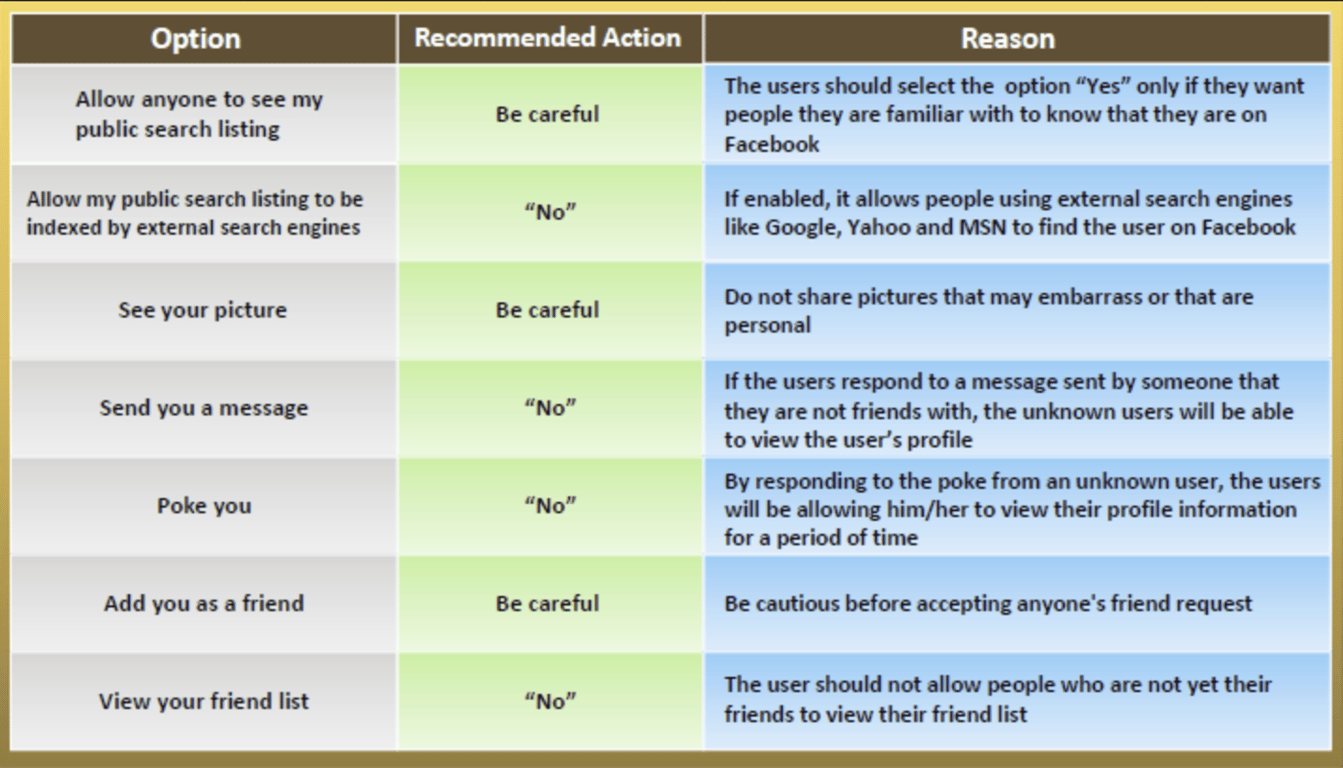
Facebook Security Tips
- Adjust Facebook privacy settings to help protect identity.
- Think carefully about who is allowed to become a friend.
- Show "limited friends" a cut‐down version of the profile.
- Facebook allows its users to make people "limited friends" or "acquaintances" who only have partial access to the user profile.
- This is useful if the users have connections who they do not feel comfortable sharing personal information with.
- Enable access to information only when necessary.
Social Networking Security Checklist
- Choose a complex/unique password for the account
- Read the privacy policy and terms of service carefully
- Do not post anything personal on the social networking site
- Set appropriate privacy and security defaults to make your profile private
- Be careful about what is posted on the Internet
- Be careful installing third‐party applications
- Only accept friend requests from people you know
- Only share limited personal information
- Apply privacy settings so that only friends can view your profile information
- Do not use common verification such as your date of birth or your mother's maiden name
- Be aware of the intentions of anyone you meet on these sites
- Restrict the access of personal videos on social networking sites to friends
- Disable the comments to prevent cyber bullying
- Do not click suspicious links to prevent malicious attacks
- Update the computer with the latest antivirus and other system security software
- Never install codecs when a site prompts you to do so
Social Networking Security Checklist for Parents and Guardians
- Read the privacy policies of the sites before allowing children to use them
- Consider keeping the computer in a family room rather than the child’s bedroom
- Instruct children to never respond to messages that are suggestive, obscene, belligerent, threatening, or make them feel uncomfortable
- Be open with kids; encourage and instruct them to seek permission before providing any details on social networking sites
- Create your own account on the social network and spend some time on the network's site to familiarize with social networking media
- Create a cheat sheet with your child's password, a list of his/her approved friends, and rules for how your child operates
- Know children's passwords, screen names, and account information; this will help in monitoring their activities
- Instruct your child to add people to their "friends" list only if they know them in real life
 Made with Bullet